DASH AI now connects content creation, learning, assessment and outcomes.

Explore what is new
TriByte — Personalized Interactive Learning

The complete TriByte platform

Every learning workflow, AI-enabled.

Create, deliver, engage, assess and improve from one connected platform - with DASH AI working across every step for learners, faculty and institutions.

  • 25+question types
  • Any sourceincluding YouTube
  • Online + offlineacross devices
Intelligence layerDASHAI
01Create
02Teach
03Engage
04Assess
05Analyse
06Operate

One trusted intelligence layer across the full learning lifecycle.

AI Content Studio

Turn source material into teaching-ready content.

Faculty can move from raw material to reviewable learning assets in minutes, while retaining control over the final academic output.
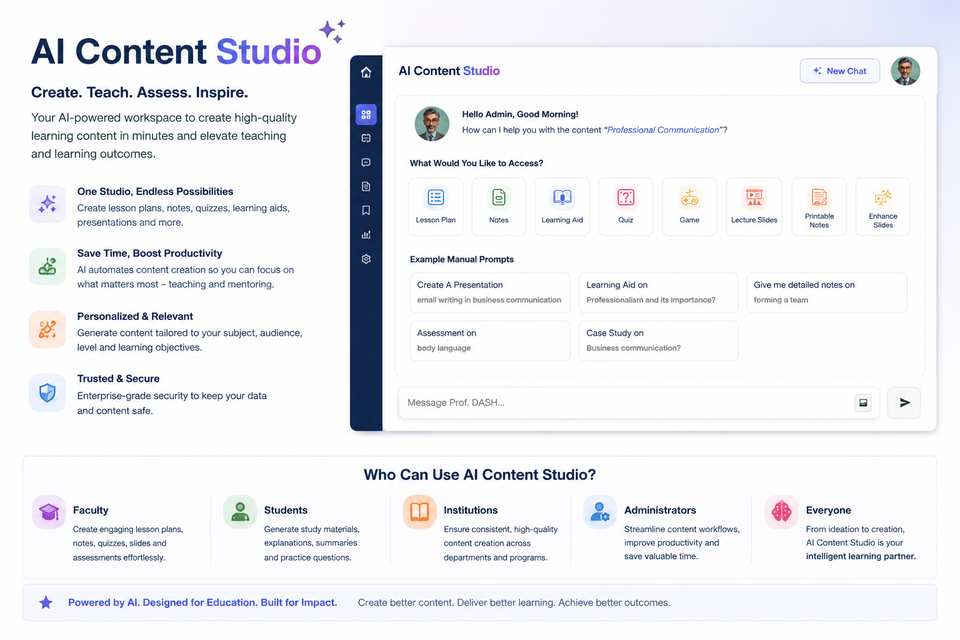
TriByte AI Content Studio interface
DASH faculty assistantOne source. Multiple learning formats.

Notes creation

Turn uploaded learning material into structured, exam-ready notes.

Learning Aid + narration

Convert content into narrated learning aids for visual and auditory learning.

PPT creation

Generate presentation-ready slides with images, structure and teaching flow.

Lesson plans

Create lesson plans, learning objectives and classroom activities in one workflow.

Question creation

Generate quizzes and questions by concept, difficulty, type and curriculum intent.

Any source material

Work from documents, PDFs, presentations, course videos and YouTube videos.

Start withPDFsDocumentsPresentationsCourse videosYouTubeWeb contentThen create notes, narration, slides, lesson plans and questions.

Interactive learning

Make every video and document active.

DASH AI helps faculty enrich existing content instead of rebuilding it from scratch.

Interactive video with DASH

  • Place questions before, during or after a video
  • Add MCQ, true/false, matching, sequence, range, matrix and open-response interactions
  • Branch learners to another section based on their answer
  • Overlay video, audio, presentations, HTML and other resources
  • Generate video indexes, subtitles, summaries and notes with AI
  • Add bookmarks, quizzes and picture-in-picture learning
TriByte interactive video platform
Visual reused from the existing TriByte feature portal.

Content in every format

  • Video, audio, PDF, image, document, PPT and HTML5
  • SCORM, LTI, web-compatible AR, VR and simulations
  • Adaptive bitrate video with multiple resolutions
  • Secure HTML5 document and video players
  • Embedded delivery with custom domain and player branding
  • Categories, tags and multilingual content variants
TriByte course management interface
Structured delivery across formats, languages and devices.
AI PAPER BUILDEROutcome-aligned assessment
Objective40%
Subjective35%
Case based25%
CO taggedBloom alignedFaculty reviewed
DIGITAL + HANDWRITTENAI evaluationRubric-aware feedback

Assessment intelligence

Create, evaluate and improve—in one loop.

Build high-stakes and everyday assessments, evaluate every response mode and connect the result to the next learning action.

  • Objective and subjective paper generation
  • 25+ question and response types
  • Questions generated from video or document content
  • Case studies and case-based questions
  • Similar questions, hints and remedial resources
  • CO and classifier tagging during creation
  • Digital and handwritten AI evaluation
  • Marks, grades, rubrics and plagiarism workflows
  • Simple, weighted, negative and custom scoring
  • Practice, certificates, badges and solved papers

AI-assisted OBE

From syllabus to evidence. Every outcome connected.

Automate the administrative weight of OBE while keeping faculty judgement, review and continuous improvement at the centre.

01AI

Generate COs

Create measurable course outcomes from the syllabus and align them with Bloom's taxonomy.

02AI

Create CO-linked questions

Generate objective, subjective, activity and case-based questions tied to course outcomes.

03AI

Map CO-PO + WK

Suggest CO-PO contribution levels and map Washington Accord knowledge profiles.

04AI

Evaluate evidence

Evaluate digital or handwritten work and retain a reviewable evidence trail.

05AI

Measure attainment

Visualise direct and indirect attainment, targets, gaps and cohort performance.

06AI

Improve continuously

Create intervention plans and keep accreditation-ready reports and evidence.
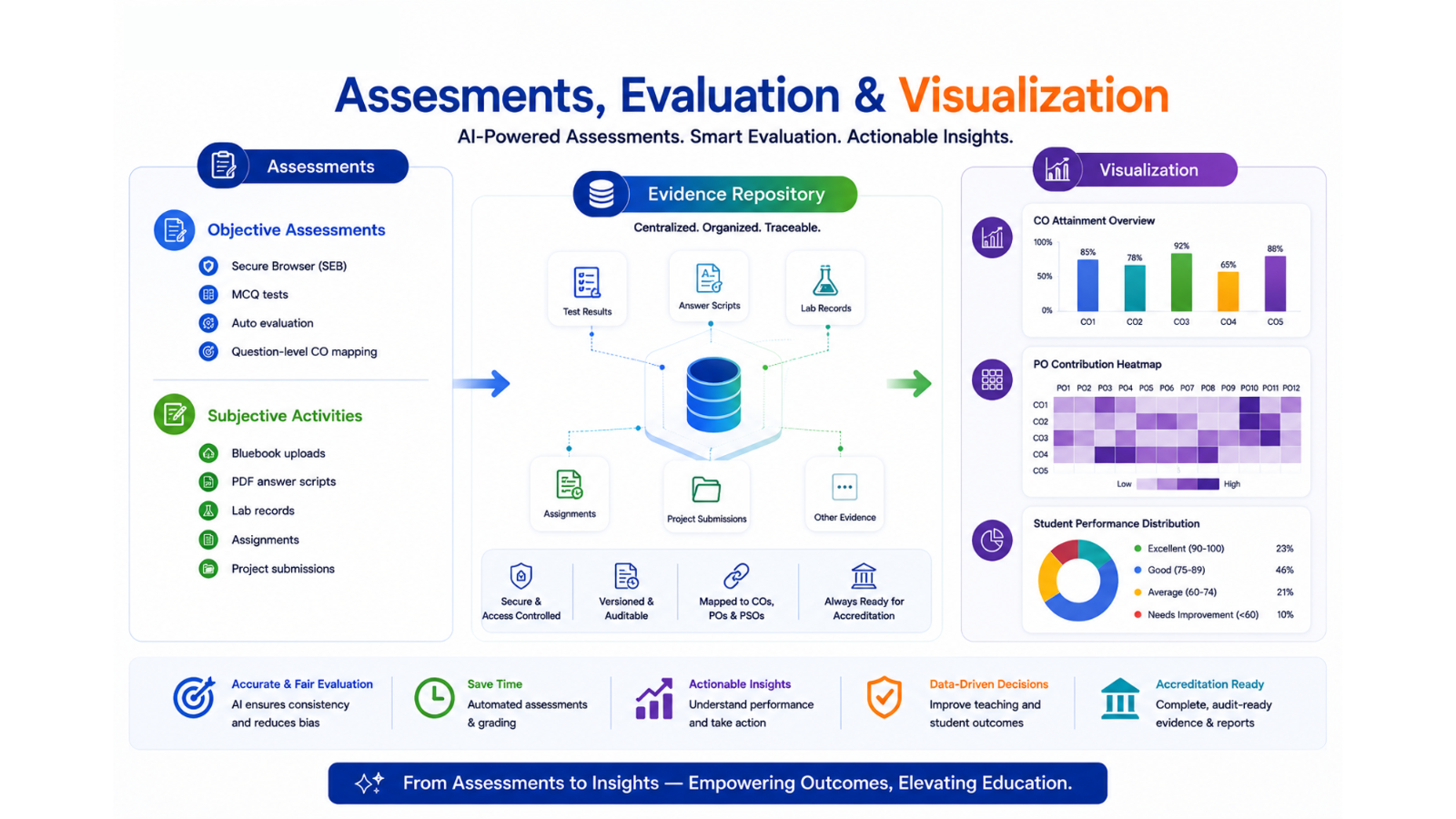
TriByte OBE evidence repository dashboard
Accreditation-ready by designCentralised, organised and traceable evidence.

Connect assessments, rubrics, mapped COs, attainment reports and improvement actions in a single institutional record.

Explore TriByte for OBE

Personalisation & analytics

Tell every learner and faculty member what to do next.

DASH AI turns course activity and assessment evidence into targeted support - grounded in the institution's own learning material.

01

DASH AI Companion

Answer learner queries with source references, create notes, compare modules, and generate flashcards, mind maps, images and StudyCards.

02

Adaptive learning paths

Use performance and behaviour to build study plans, recommend content and adjust difficulty toward mastery.

03

AI rank prediction

Predict rank and readiness from accuracy, pace, difficulty mix and comparative performance.

04

Assessment analysis

Surface concept gaps, rushed mistakes, wasted time, score opportunity and a personalised action plan.

PERSONALISED INSIGHTSAssessment action planDASH AI
Predicted rank#1of this cohort
Readiness96%exam ready
Score upside+30recoverable marks
Physics92%
Chemistry84%
Biology88%
AI NEXT ACTIONFocus on rushed mistakes in Organic Chemistry.

Assign a 20-minute concept sprint, then retest with similar questions.
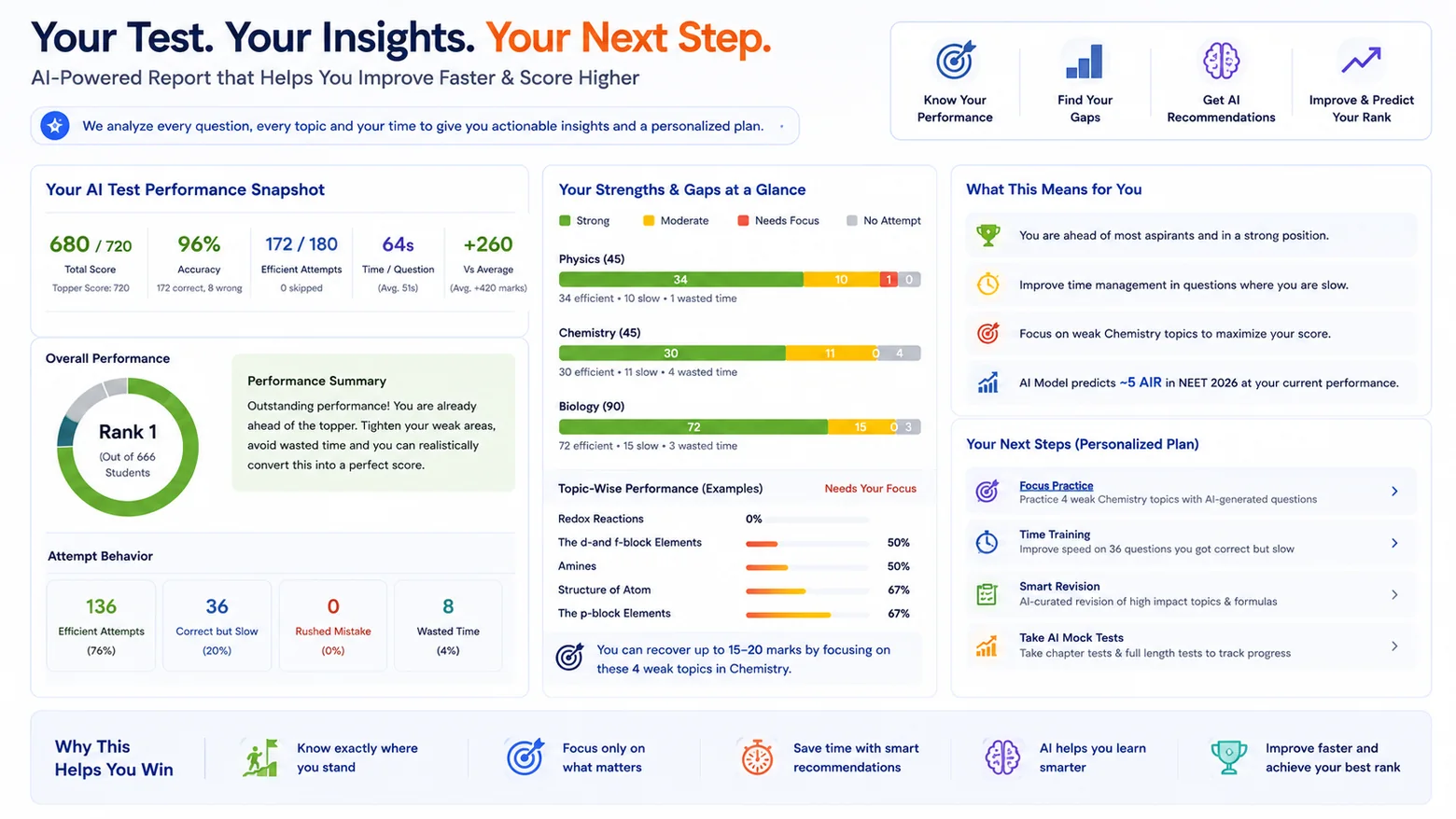
TriByte DASH learning dashboard

Platform foundation

Everything needed to run learning at scale.

Each capability is connected to DASH AI for assistance, automation or insight where it adds value.

Course & content management

Structure, govern and deliver complete learning programmes with less operational effort.

  • Multi-level course structures, categories, tags and multilingual variants
  • Video, document, audio, HTML5, SCORM, LTI, AR, VR and simulation support
  • Scheduled delivery, content dripping, sequential paths and study plans
  • Review, approval and publishing workflows with configurable roles
  • Bulk import for users, content, quizzes and questions
  • Tasks, gradebooks, feedback, FAQs, glossaries and mail templates

Learning on every device

Give learners a consistent experience across connectivity, location and device constraints.

  • Learner, faculty and administrator browser portals
  • Native Android, iOS and Windows applications
  • Secure offline content and assessments with automatic sync
  • Device-locked downloads, content expiry and usage synchronization
  • LearnBox local-cloud delivery for centres and low-connectivity locations
  • Adaptive streaming, multiple resolutions and configurable CDN delivery

Live classrooms & attendance

Bring synchronous learning, scheduling and participation evidence into the same platform.

  • Zoom, Google Meet, Zoho Meeting and BigBlueButton support
  • Intelligent class scheduling across available licences
  • Automatic recording retrieval where provider APIs support it
  • Classroom and online attendance tracking
  • Detailed attendance analytics by learner, class, batch and period
  • Launch any additional web-based classroom provider

Engagement, communication & grievances

Keep learners connected, supported and accountable throughout the learning journey.

  • One-to-one, one-to-many and many-to-many discussion forums
  • Complete grievance management with configurable escalation matrices
  • Learner feedback and course-improvement workflows
  • Email, SMS, app and WhatsApp notifications
  • Action-based reminders for assessments, tasks and due dates
  • Points, streaks, leaderboards, badges and event-driven rules

Administration, security & governance

Protect institutional content and manage complex organisations with precise controls.

  • User, group, centre, region and batch management
  • Role-based authorization with custom roles and permissions
  • SAML/OpenID single sign-on and structured user tagging
  • Geo, domain and IP restrictions with private streaming
  • Encryption, watermarking and periodic user stamping
  • Role-controlled dashboards, audit-friendly reports and data ownership

Integrations, commerce & customization

Fit TriByte into the systems, brand and business model your institution already uses.

  • REST APIs, LTI 1.3, CRM connections and configurable data exchange
  • Payment gateways, products, subscriptions, invoices and coupons
  • Freemium previews, promotions and mobile purchase journeys
  • Custom domains, white-labelled portals, players and mobile apps
  • Custom email and assessment-summary templates
  • Configurable dashboards, scheduled reports and Google Analytics
TriByte supported learning methods
Visual reused from the existing TriByte feature portal.

One platform, many pedagogies

Self-paced, live, blended, remedial, adaptive and skill-based.

TriByte supports the way your institution already teaches - then brings AI assistance, analytics and personalisation into the flow.

  • Sequential and non-sequential journeys
  • Stage-based access and content validity
  • Online, offline and blended delivery
  • Personalised practice and remediation

See the platform around your workflow

Bring your learning ecosystem together.

Tell us what you teach, how you deliver and what you need to measure. We will show you the capabilities that fit.

Book a tailored demo